
Home / Tutorial
ChatGPT redemption code How to top up
This guide is for people who have ordered on AICZ and need to redeem their codes themselves. First find the code and "Redemption tutorial" link on the order page or delivery email, and use only the portal we provide. The steps below apply to current self-service ChatGPT monthly-card top-ups; Google-channel products, ready-made accounts, Codex phone verification and historical credit-pack orders, following the tutorial saved with the order. Do not mix redemption portals. Official OpenAI gift cards add wallet funds at chatgpt.com/redeem, which differs from our redemption-code process and does not automatically activate a subscription.
Find orders and retrieve SMS codes
'Receiving a code' here means receiving a top-up redemption code on our order page or by delivery email, not receiving an SMS verification code.
After payment, open Find my order, or check the delivery email. In delivered orders, find the full redemption code and that order's 'Redemption tutorial' link. For new and historical order lookup, see Purchasing and order lookup help.
If the redemption code is not displayed yet, check whether the order has shipped. Do not switch to a redemption site found through search or use links sent privately by others. Once the code is delivered, complete redemption using the steps below or the tutorial saved with that order.
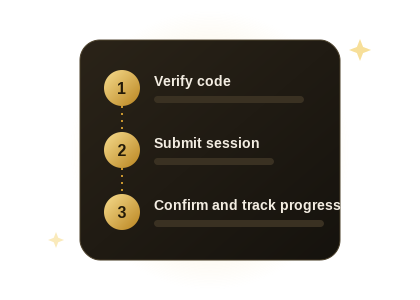
Verify code
On the shipped order page (or in the delivery email), copy Full redemption code, open the redemption page, select "Submit top-up," paste and validate the code. The page shows its associated plan. Confirm it matches your purchase before continuing.
One code per line. If you bought multiple items, submit only one code at a time.
Submit session
Sign in through a browser The account you want to top up (chatgpt.com), stay signed in, then open in a new tab https://chatgpt.com/api/auth/session. The page displays JSON (including a "user" field),Select all and copy the complete content, and paste it into the Session field on the redemption page.
Do not substitute screenshots or edit the content. If the Session is reported expired, sign in to chatgpt.com again and retrieve a new one.
Confirm submission and check progress
Verify the account and plan shown, then confirm submission. It usually completes within one minute. Refresh ChatGPT or sign in again to see the subscription. You can also enter the redemption code under 'Task lookup' at the redemption entry point to check processing status.
Submission failed. Try again later. Do not repeatedly top up one account with multiple codes; contact support with your order number if problems arise.
Read before topping up
- Go / Plus / Pro: current monthly cards require no active subscription by default; App Store / Google Play subscriptions must expire with renewal disabled. For a prorated upgrade, contact support to confirm first.
- If the order is for the Google-channel product, account conditions and lost-subscription handling follow This product page; do not apply this page's default monthly-card conditions. That product page states that existing Go or unexpired Plus can also be topped up. "Refund based on remaining days if the subscription is lost" applies only to that product, not sitewide. The public page does not specify how remaining days are counted, claim deadlines or whether official deactivation is covered. Details depend on the product purchase page and order confirmation.
- Team / Business users should leave their workspace first. Abnormal accounts, existing-subscription conflicts, and prohibited sharing are outside normal top-up after-sales coverage.
- If you have a historical Codex credit-pack order, follow the tutorial saved with that order. Currently Codex This sells phone verification only, without a subscription or Codex credits.
- Historical orders follow their saved tutorials and original terms. Do not mix redemption entry points from different suppliers.
Security reminder
- Use only the redemption entry point on our order page, not links found in search or sent privately by others.
- Submit redemption codes and login credentials only on the redemption page. Do not send them privately to anyone.
- Do not expose complete redemption codes, login credentials, passwords, or verification codes in group chats or screenshots.
- Our support will never ask for your account password.
Which products this guide applies to
This page's main code-validation and Session-submission process applies to current self-service monthly passes for topping up your own account:
- ChatGPT Plus monthly pass · Philippines region
- ChatGPT Pro 100 monthly pass · Egypt region
- ChatGPT Pro 200 monthly card · Philippines region
- ChatGPT Pro 500 monthly card · Egypt region
ChatGPT-Plus official top-up - self-service redemption code - Google channel and ChatGPT-Go official top-up - self-service redemption code - Egypt region This also tops up your own account, but the product page says a top-up link is sent after payment, and its account requirements differ from the default monthly card above. Follow the tutorial saved with the order and its product page; do not mix redemption portals. "Official top-up" in the product name is the merchant's channel label, not official OpenAI authorization or certification.
Ready-made accounts, US Apple IDs, Muse and Codex phone verification do not involve submitting a code to your own ChatGPT account. Open the corresponding product tutorial; this page's Session process does not apply.
Common troubleshooting
Only currently verifiable information is listed. Replacements and refunds follow the product purchase page and order confirmation; this page makes no additional refund promises.
- Open
https://chatgpt.com/api/auth/sessionthen see{}, or the copied result has no "user" field: usually the current browser is not logged into the account you want to top up. Sign in to chatgpt.com in this browser, reopen the address, then select and copy the entire JSON. - If you copied only part of the Session or submitted a screenshot or edited content, the redemption page may not recognize it. Copy the complete content again; do not substitute a screenshot.
- Session expired: sign in to chatgpt.com again, obtain a new Session and submit it.
- Submitting multiple codes at once or pasting multiple segments on one line: each line is one code. Even if you bought several items, submit only one code at a time.
- After a submission fails, do not repeatedly top up the same account with multiple codes. Try again later; if the issue persists, contact support with your order number.
- Only provide your order number to support. Do not send account passwords, verification codes or full login credentials.
Related information
Want to pay with USDT? See USDT payment guide.
For redemption or order-lookup questions, see Help center. For plan and purchase-condition comparisons, see ChatGPT subscription top-ups.
This site is an independent third-party service with no affiliation or official partnership with OpenAI.